Pharmacovigilance teams process large volumes of literature every week: case reports, regulatory updates, marketing pieces, and review articles. A PV specialist has to read through all of it to find the publications that actually contain safety-relevant information. DrugCard’s AI features are built to support that process at four specific points: initial relevance screening, article triage, note documentation, and case data extraction.
Below is a detailed look at each of the four capabilities, how each one works step by step, and where it fits into the daily literature screening workflow.
1. AI-Based Filtering / AI Relevance Indicator
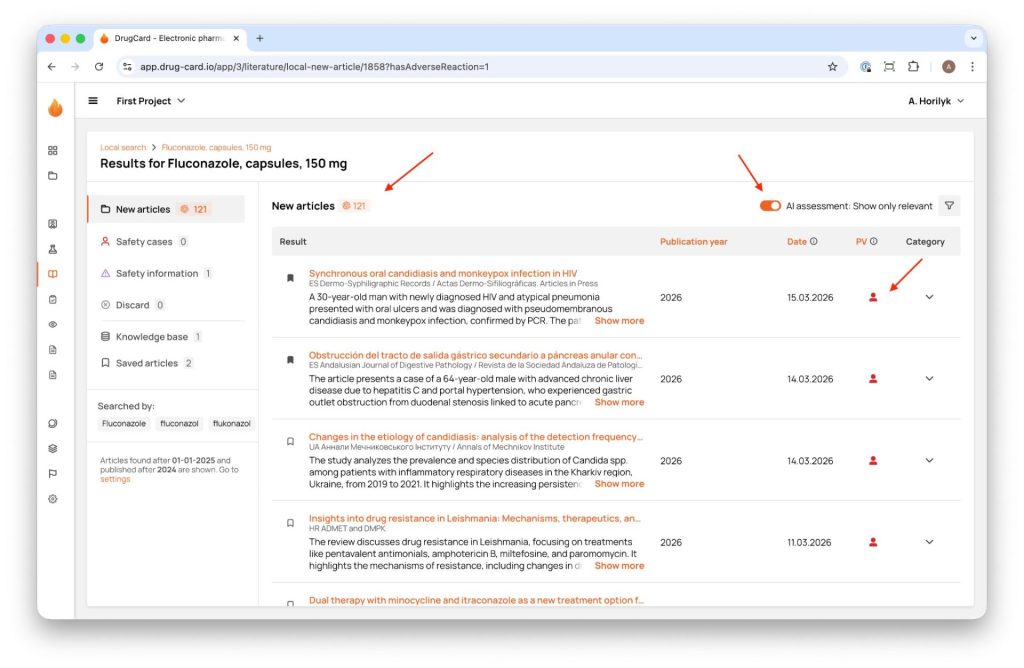
Every article picked up during local or global literature monitoring is automatically run through an AI relevance assessment as soon as it’s captured by the system. The result is shown as a compact AI Relevance Indicator in a dedicated “PV” column of the article list:
- A person icon indicates the article is assessed as relevant to pharmacovigilance
- A dash (–) indicates the article is assessed as not relevant
- N/A means the article hasn’t been evaluated by AI yet
This indicator drives a toggle at the top of the results page, “AI assessment: Show only relevant,” which collapses a list of hundreds of articles down to the ones the system flags for closer review. The same indicator can also be used as a sort key, so specialists can order the entire list by AI relevance and work through the highest-priority publications first.
The classifier operates on the New articles list, before any human categorisation happens. For a team screening dozens of products across multiple countries, this can reduce a 150-article daily queue to a fraction of that size. Filtering is optional and reversible at any time: the full, unfiltered list stays available, and articles marked “not relevant” remain visible and searchable. Nothing is hidden or discarded automatically.
2. Article List / Article Preview and Expansion (AI-Generated Summary)
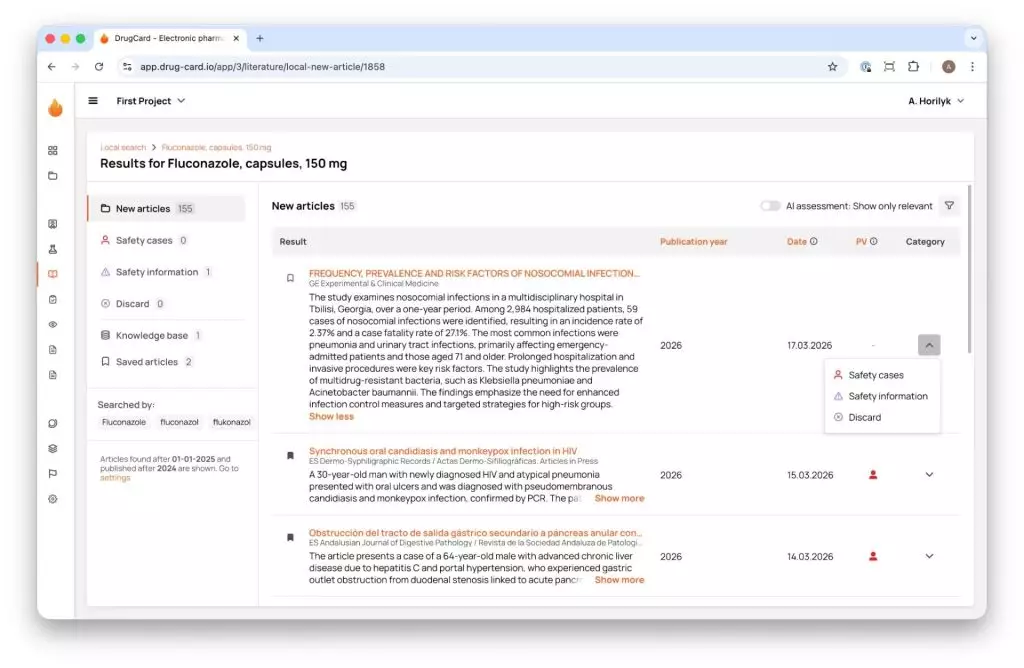
Every article in the search results carries an AI-generated summary: a short abstract in English, generated regardless of the publication’s original language. The summary typically covers the study context, the patient population, the key findings, and the outcomes or conclusions.
The summary appears directly under the article title in the results list, with a “Show more” / “Show less” toggle so specialists can expand it for detail or collapse it while scanning. The full original article is one click away via the article title.
Because the summary is generated in English regardless of source language, and DrugCard also provides full machine translation of the entire article (via DrugCard Spotlight and Google’s translation engine, with keyword highlighting preserved in the translated version), a PV specialist can triage a Ukrainian, Spanish, or German case report at the same speed as an English one, without a manual translation request.
This feature sits at the same stage as the relevance classifier: the specialist reads the AI summary to decide whether to open the full text, save the article for later, or move on. It reduces the number of full articles that need to be opened and read in detail.
3. AI-Generated Notes
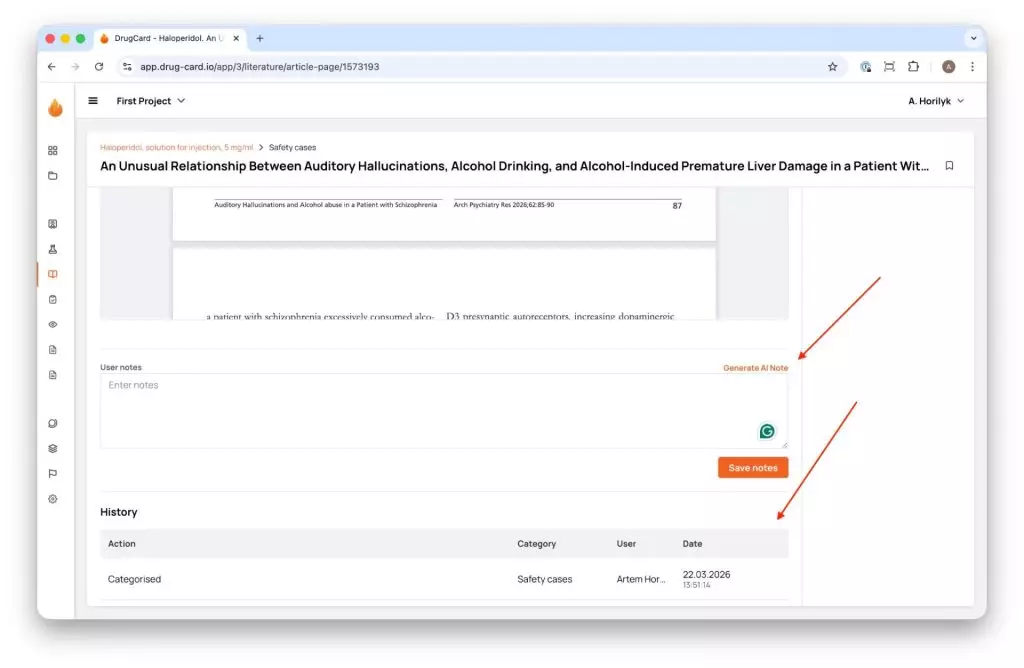
Once an article is categorised as a Safety case or Safety information, the next task is documenting the assessment in the User notes field. A Generate AI Note button is available above that field on the Article Card for any categorised article. Clicking it produces a structured summary tailored to the specific product the article is linked to and the keywords configured for that product’s literature monitoring.
The generated note follows a consistent four-part structure:
- Patient — patient characteristics described in the article
- Product — the relevant medicinal product
- Reaction — the adverse reaction or event described
- Special situation — where applicable, such as pregnancy, overdose, or off-label use
The AI-generated text is inserted below any existing content in the notes field, so it never overwrites what a specialist has already written. Nothing becomes part of the record automatically: the user reviews the generated text, edits it if needed, and clicks Save notes to confirm it. Until that click, the note is a draft on screen.
This feature comes in after categorisation, at the documentation step. It speeds up how fast a specialist can produce a clear, structured note.
4. AI Case Extraction
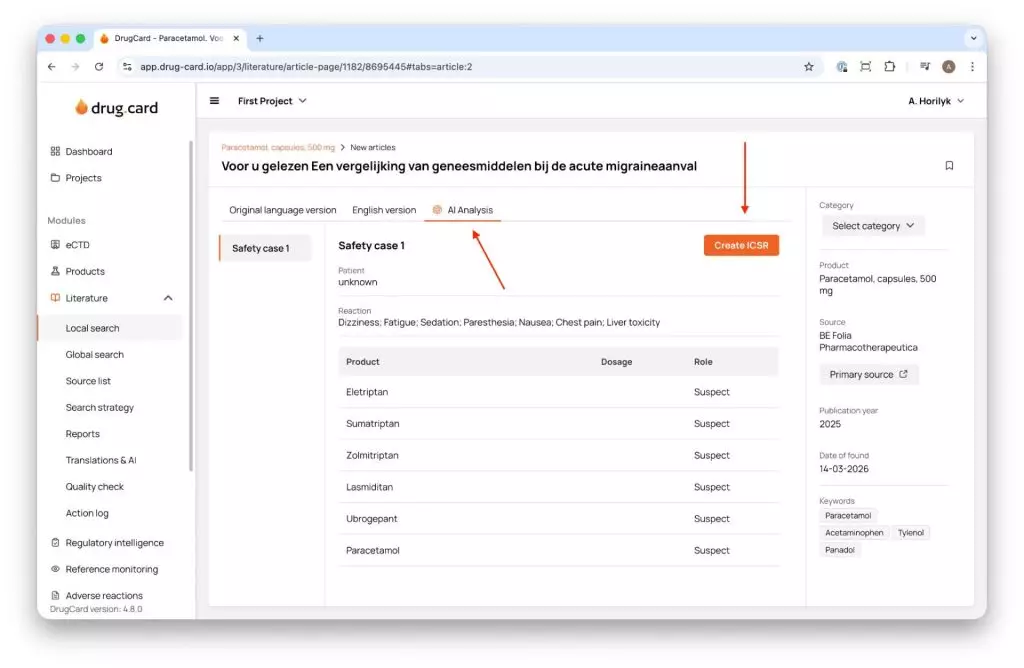
The AI Analysis tab of the Article Card is where the AI has already read the article and extracted structured data across three dimensions: patient data, identified reactions, and mentioned active substances, including their assigned role (for example, Suspect), shown in a structured table.
If the article describes more than one potential safety case, each one is presented as a separate labelled block (“Safety case 1,” “Safety case 2,” and so on), so multiple cases within a single publication aren’t merged into one.
From the same tab, a Create ICSR button lets the specialist generate an Individual Case Safety Report directly into the Adverse Reactions (R3) database configured for the company. The patient, product, and reaction data pulled from the AI analysis pre-populates the new case form, so a specialist starts from a partially completed draft rather than a blank E2B(R3) template.
This is the connection point between literature screening and case processing. A case that would once require re-reading the full article and manually populating every field now starts from a validated draft that the specialist checks against the source text, corrects or completes where needed, and carries forward to submission.
Every Output Requires Human Confirmation
All four features share the same underlying rule: every AI output, whether a relevance score, a summary, a note, or extracted case data, is decision support. None of it is saved, submitted, or reported automatically. A specialist reviews, edits where needed, and actively confirms each categorisation, note, and case before it becomes part of the official record.
That rule is built into the interface itself, not left to procedure: notes require an explicit save, categories require an explicit selection, and cases require a specialist to open the ICSR draft and act on it. The AI speeds up the parts of the process that don’t require expert judgment, and leaves the parts that do require it entirely in the specialist’s hands.
Curious how AI-assisted literature screening could fit your team’s workflow? Get in touch with DrugCard to see it in action.